Blindness can't limit curiosity.
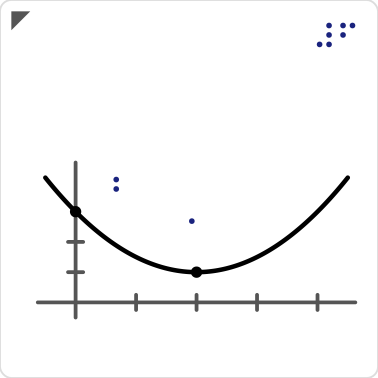
Blind and low-vision students learn maths graphs from raised-line plates they read with their fingertips. Making one by hand can take hours. With Locus, a teacher writes one email and gets back a plate that is ready to 3D print.
How to use Locus
- 1
Write what you are teaching
A function and the points your students should find, or just today's topic, in your own words. The Request page turns it into an email.
- 2
Locus draws the plate
An AI agent reads your email and lays out the graph: raised lines, a dome on each point, and braille labels.
- 3
It is checked by touch
Before anything is sent, five rules measure the plate the way a fingertip reads it. If a rule fails, the agent fixes the layout and checks again.
- 4
You print it
Minutes later you get a reply with the print file. If your school has a print shop connected, the order goes to them too.
What you get back
The print file
One STL file. Print it at 100% scale on any 3D printer, flat on the bed, in PLA.
A description for the learner
The graph in plain sentences: what the curve does and where every marked point is.
A page in the collection
A 3D preview, the touch checks it passed, and every file, for you and for other teachers.
Tips for a good request
- One function per request, written like
y = -0.5x^2 + 2x + 1. Straight lines, parabolas and cubics work. - Say where the graph starts and ends, for example "x from -0.5 to 4.5".
- Name the points to find: the highest or lowest point, the turning points, where the curve crosses an axis.
- Only a topic? That works too. Locus asks you one question before it draws anything.
Subject: Tactile graph: projectile

Please make a tactile graph of y = -0.5x^2 + 2x + 1
for x from -0.5 to 4.5.
Please mark the highest point and where the curve
crosses the y-axis.
Good to know
Unreadable graphs are never sent
If a curve only touches an axis, a fingertip would feel one line there. Locus explains why and suggests what to change, instead of sending a plate that cannot be read.
Every plate has an ID
A braille number in the top-right corner leads back to the graph's page. Hold the plate with the raised triangle at the top-left.
The teacher stays in charge
The rules measure the spacing and sizes a fingertip needs. How the graph fits the lesson is the teacher's call, and every plate comes with a description to guide it.
For schools setting it up
Locus runs in your own GitLab project and publishes to your own Google Cloud. The setup takes under an hour, once, and is written up in the project's documentation: